
Latest News
2022 Start working on a new website
BBS Trading Expert
Watch the Youtube BBS video and here is a crude oil trading example
Want to know more about:
AXIOM business books awards, bronze medal! Thank You!
No longer available!
Favorite articles in 2010, 11, 12, 14 and 2015 S&C Readers' Choice Awards.

AXIOM Business Books Awards, bronze medal.

Money and Risk management Part 3
Risk Management
Once a buying order is executed, you must limit the risk by keeping an initial stop. The initial stop itself is variable from trade to trade because it will be based on different technical analysis techniques.
Special offer: "Capturing Profit with technical Analysis"
On the other hand, you must use a trailing stop as the ultimate selling signal to avoid losing too much profit.
And, of course, you must apply the money-management technique as explained in the previous paragraph.
Initial Stop
AdvancedStop.dll is an external DLL file that is available free of charge thanks to Richard Dale http://www.premiumdata.net
This external DLL file allows the fixing of a result until it is reset (flip-flop function).
We use this external DLL file function in the next formula for the graphical representation of an initial and trailing stop.
At the time of this writing, this free DLL file was available at http://www.tradernexus.com/advancedstop/advancedstop.html
The following MetaStock® formula “SVE_Stop_Trail%_Date” creates an initial and percentage trailing stop on the price chart from an entry date:
{SVE_Stop_Trail%_Date - Fixed percentage trailing stop from date}
InpMonth:=Input("Month",1,12,1);
InpDay:=Input("Day",1,31,1);
InpYear:=Input("Year",1800,2050,2009);
LongShort:=Input("1=Long or 2=Short? ",1,2,1);
InitStop:=Input("Initial Stop Price",0.1,10000,10);
Perc:=Input("Trailing Stop Percentage",1,30,12);
Loss:=C*Perc/100;
Entry:= InpYear=Year() AND InpMonth=Month() AND InpDay=DayOfMonth();
StopLong:=ExtFml( "AdvancedStop.StopLong", Entry,InitStop,0,C-Loss,0,0,0,0);
StopShort:=ExtFml("AdvancedStop.StopShort",Entry,InitStop,0,C+Loss,0,0,0,0);
Trail:=If(LongShort=1,Stoplong,Stopshort);
Trail
Initial Stop Application
Let’s assume we bought the stock in figure 10.4 on January 6, 2003, based on the fact that the closing price was breaking the downtrend line.
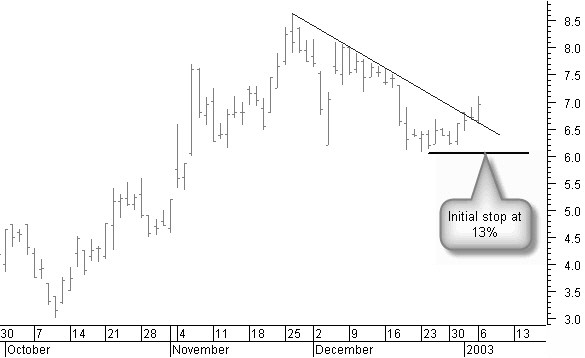
Figure 10.4: Buying the stock on January 6, 2003.
With an initial stop at $6.1, we are at the support of a previously low pivot point. With a closing price below this stop, there is a good chance that the correction phase is not finished and that it will be better to close the trade with a loss. This stop gives a possible 13% loss and keeps the trade more or less within the limits of an acceptable loss on a single trade.
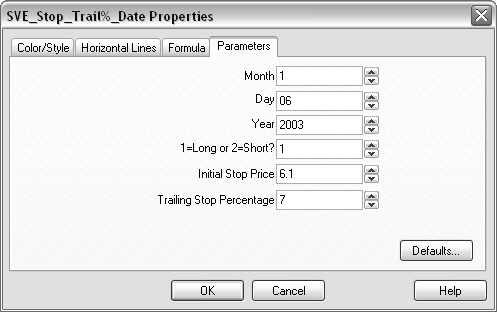
Figure 10.5: Entering the stop properties.
Opening the formula “SVE_Stop_Trail%_Date”, we enter the date (figure 10.5) in this trailing stop date function; we select 1 for a long position and we set an initial stop value of $6.1.
Finally we set the trailing stop at 7%, but we can change this value once the price begins moving in the right direction. We will close this long position at the latest when the closing price falls through the initial or trailing stop.
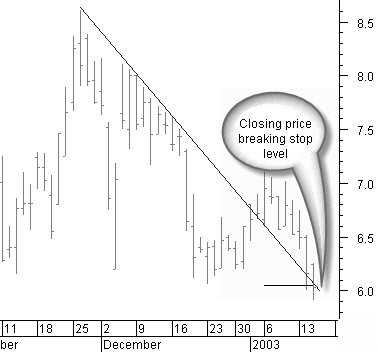
Figure 10.6: Stop broken right from the start.
Unfortunately, right from the buying moment, the price starts falling and passes the initial stop (figure 10.6).
When the closing price drops through the initial stop, the transaction is closed.
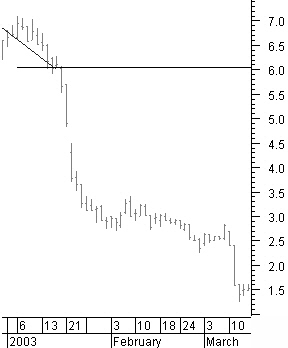
But, as you can see in figure 10.7, it is a consolation to know that without this stop, this trade could have ended in catastrophe. That’s why keeping an initial stop is so important: to limit the loss after opening a position.
This initial stop is the last warning to sell! It is bad practice not to obey this last warning!
Figure 10.7: Disastrous trade without a proper stop.
Money & Risk management next -Previous -Part 1 -Part 2 -Part 3 -Part 4 -Part 5 -Part 6
STOCATA Stocks Technical Analysis HOME
Links
Find a Stock ticker symbol, enter the ticker and find a chart, news, fundamentals and historical quotes.
Risk Disclosure: Futures and forex trading contains substantial risk and is not for every investor. An investor could potentially lose all or more than the initial investment. Risk capital is money that can be lost without jeopardizing ones’ financial security or life style. Only risk capital should be used for trading and only those with sufficient risk capital should consider trading. Past performance is not necessarily indicative of future results.
Hypothetical Performance Disclosure: Hypothetical performance results have many inherent limitations, some of which are described below. no representation is being made that any account will or is likely to achieve profits or losses similar to those shown; in fact, there are frequently sharp differences between hypothetical performance results and the actual results subsequently achieved by any particular trading program. One of the limitations of hypothetical performance results is that they are generally prepared with the benefit of hindsight. In addition, hypothetical trading does not involve financial risk, and no hypothetical trading record can completely account for the impact of financial risk of actual trading. for example, the ability to withstand losses or to adhere to a particular trading program in spite of trading losses are material points which can also adversely affect actual trading results. There are numerous other factors related to the markets in general or to the implementation of any specific trading program which cannot be fully accounted for in the preparation of hypothetical performance results and all which can adversely affect trading results.
See more 'Legal Disclosures' in the bottom menu bar!